DVLA Check Code: Share Your Driving Licence
A DVLA check code lets you share your driving licence details, or lets someone else check yours, in a couple of minutes. Free, valid for 21 days, single-use.
What Is a DVLA Licence Check Code?
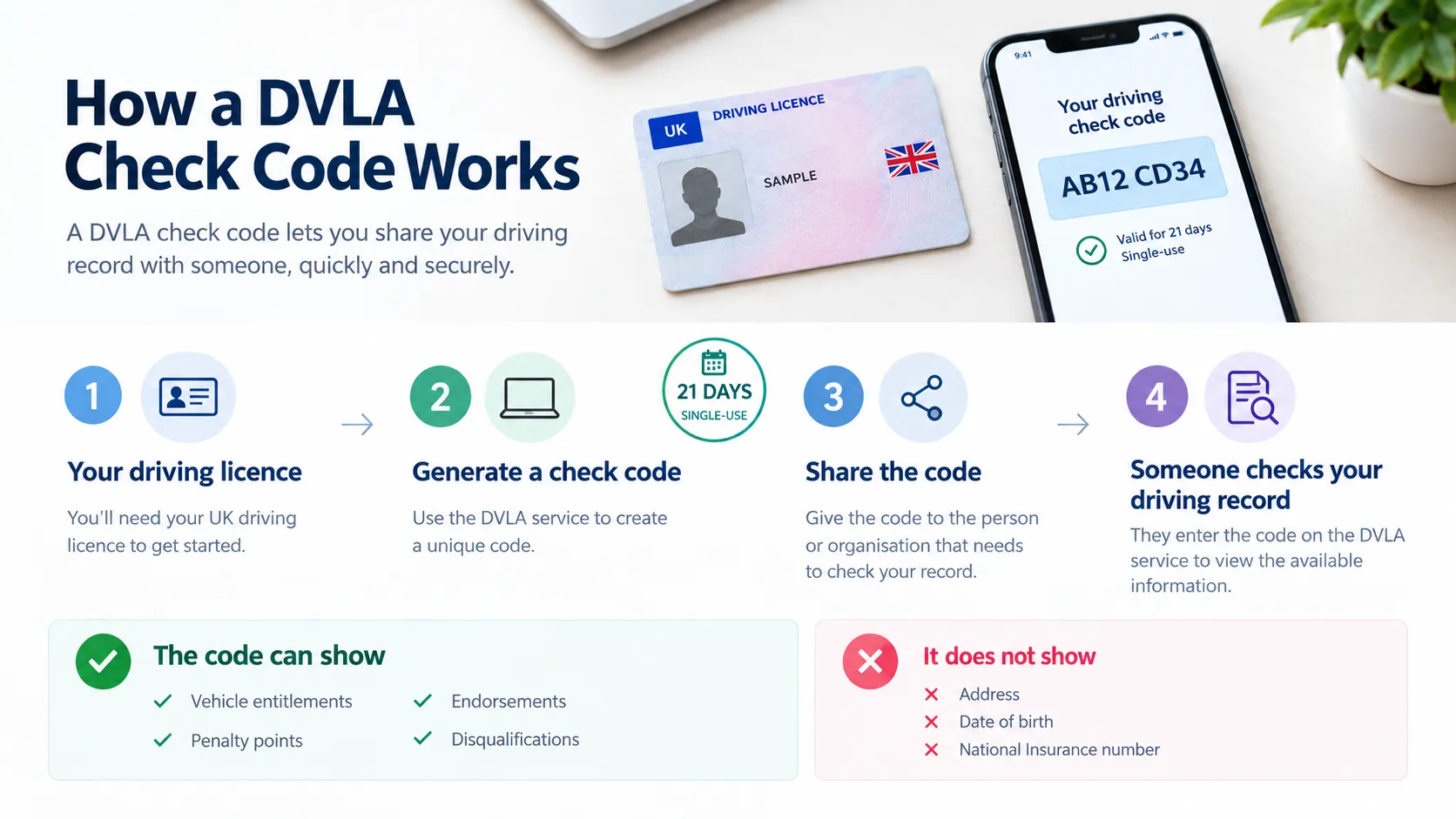
A check code is a free, one-time code that lets you share your driving licence details with someone else, such as an employer, a car hire company, or a licensing authority. It’s generated through GOV.UK, made up of eight characters, and stays valid for 21 days. The wording varies depending on who’s asking, but it’s always the same underlying government service.
This system replaced the paper counterpart to the photocard licence, which DVLA scrapped in June 2015. Before that, penalty points and endorsements were printed on a green paper document kept alongside your licence, and anyone who needed to see your points total simply looked at it.
Once that document was withdrawn, there was no physical way to prove your points total, so DVLA built an online alternative. The check code is that alternative. Some drivers who remember the old system still call it an electronic counterpart check code, even though DVLA itself doesn’t use that term.
What a licence check code actually shows
Generating one gives someone temporary, read-only access to part of your driving record, not the whole thing. It shows the vehicle categories you’re entitled to drive, any current penalty points, endorsements, and disqualifications. It does not show your address, your date of birth, or your National Insurance number. The person checking it only sees what’s relevant to confirming you can legally drive.
Valid for 21 days
One-time use, then it’s dead, even if unused when the window closes.
Shows your record
Entitlements, points, endorsements and disqualifications only.
Completely free
No charge to generate a code or for someone to check it.
How to Get a DVLA Counterpart Check Code
The whole process takes a couple of minutes online. There are two ways to generate a code, depending on whether you’ll need one once or repeatedly.
Go to the DVLA service
Visit gov.uk/view-driving-licence and click “Start now.” Accept or manage cookies when prompted.
Enter your details
Driving licence number, National Insurance number, and postcode, exactly as they appear on your licence.
Confirm your record
You’ll see a summary page showing your vehicle categories, points, and any endorsements before you go any further.
Generate your DVLA Check Code
Select “Get your check code,” then “Get a code.” An eight-character code appears instantly.
Copy it exactly
No spaces, case-sensitive. Copy and paste where possible, since autocapitalise can silently break it.
Share it
Give it to whoever asked, plus the last 8 characters of your licence number if they need it to look you up.
The standard route
Enter your licence number, NI number and postcode fresh each time via gov.uk/view-driving-licence. Quickest for a one-off code, but repetitive if you need several.
Driver and vehicles account
Set one up at gov.uk/dvla/account and generate a code just by logging in. Setup takes about five minutes and needs a passport. Worth it if you hire often or renew a taxi/PHV licence annually.
Can’t do this online? Call the DVLA contact centre on 0300 083 0013, Monday to Friday 8am to 7pm, or Saturday 8am to 2pm, and staff can generate a code for you over the phone.
What You Need
Three pieces of information, all matched against your DVLA record before a code will generate.
Driving licence number
The 16-character reference printed on your photocard, usually starting with the first five letters of your surname.
National Insurance number
Used to match your identity against DVLA’s record. Found on your payslip, P60, or National Insurance card.
Postcode
Must match the address currently held on your licence. A recent house move without an update to DVLA is one of the most common reasons this step fails. If you’ve moved and not told DVLA, update your address first.
All three details need to match exactly what DVLA holds on file. A single mistyped digit or a postcode with the wrong spacing is enough to stop the process before a code is generated at all.
How to Use a Licence Check Code
For employers, hire companies and licensing officers checking a code someone has shared with them, not generating your own.
If someone has shared a code for license check with you, you’ll check it through DVLA’s “Check someone’s driving licence information” service on GOV.UK. You’ll need the code itself and the last 8 characters of their licence number, which they should provide alongside the code. Without both pieces, the lookup won’t work.
Once entered, the service shows the same information the driver could see: their vehicle entitlements, current penalty points, endorsements, and any disqualifications. It doesn’t show their address or National Insurance number. Each code works once, so if you need to check the same person again, for an annual review, say, ask them to generate a new one rather than trying to reuse the old code.
For employers running regular checks
Employers may use check codes to verify a driver’s licence details and entitlement to drive. Make sure the driver provides the check code for the purpose of carrying out the check. For employees who drive as part of their job, employers may also have their own policies for how often driving records are reviewed.
A check code confirms entitlement, not identity
The code proves what the licence holder is entitled to drive and their current points. It does not confirm the licence belongs to the person in front of you
For fleet and driver onboarding, pair a licence check with a separate identity check where it genuinely matters, rather than treating a check code as proof of who someone is
Who Needs a Check Code?
Not every driving-related request actually calls for one. Here’s how the main situations differ.
You’ll need one if…
You’re hiring a car or van.
Most UK hire firms ask for a code alongside your photocard licence, particularly for higher-value vehicles.
An employer checks your entitlement to drive for work.
Common at onboarding and as an annual review for driving roles.
You’re applying for or renewing a taxi or PHV licence.
Local licensing authorities typically won’t process an application without a current code.
An insurer verifies your record.
Usually after a change in circumstances, such as adding a new named driver.
You’ve lost your licence or forgotten your number.
The online service can still confirm your record even without the physical card in hand.
You probably don’t if…
Someone just wants to see your photocard licence.
Plenty of everyday checks only need the physical card, not a code.
You’re only confirming identity, not driving record.
A check code proves entitlement, not who you are. That’s a separate check.
You’re hiring in the US or most countries outside Europe.
Most desks outside Europe don’t check DVLA data at all.
Using a Check Code for Taxi and PHV Licensing
Local councils that issue taxi and private hire vehicle (PHV) driver licences almost always require a current code as part of the application, and again at each renewal. It’s usually one line in a longer checklist alongside a DBS check, a medical declaration, and proof of address, but it’s also one of the most common reasons an application gets held up, simply because the code has expired by the time the council processes the paperwork.
Generate your code as close as possible to the date you actually submit your application, not weeks in advance, and follow your council’s own instructions on how to send it, since some want it emailed and others want it uploaded through a portal.
How Long Does a DVLA Check Code Last?
It lasts 21 days from the moment it’s generated. Once that window closes, the code stops working whether it’s been used or not. There’s no grace period, and you’ll simply need to generate a fresh one through the same process.
It’s also single-use. As soon as the person you shared it with redeems it, the code is dead, even if there’s time left on the 21-day window. If you need to share your record with more than one person or organisation, a hire company and an insurer, say, generate a separate code for each one rather than trying to reuse a single code.
Managing multiple codes
You can hold up to 15 active codes at any one time. Each one shows its own status in the online service, active, expired, viewed, or cancelled, so you can see at a glance what’s still usable. If your plans change and you no longer want someone to be able to use a code you’ve generated, you can cancel it yourself rather than leaving it live for the rest of its 21 days.
Getting a Check Code for Driving Abroad
Whether you’re asked for a check code hiring abroad depends entirely on the hire company, not on any single rule. Within Europe, it’s fairly common for rental firms to ask for one alongside your UK photocard licence, since many European operators are used to the DVLA system through UK-based franchises or partner networks. In the US and several countries outside Europe, most hire desks don’t check DVLA data at all and rely instead on your photocard licence, a passport, and a matching payment card.
Because you won’t always know in advance which category your hire company falls into, the safest approach is to generate the code no more than a couple of days before you travel (remember, it’s only valid for 21 days) and keep a screenshot or saved PDF of it on your phone in case you don’t have signal or data when you land. Some countries also require an International Driving Permit alongside your licence; this depends on the destination country, not on DVLA, so check gov.uk/driving-abroad for the current list before you go.
DVLA Check Code vs Share Code
Two terms that get confused constantly, including by people who search for the wrong one entirely when they actually needed the driving licence version.
|
Question |
Answer |
|---|---|
|
DVLA check code vs Home Office share code? |
Different systems entirely, run by different government departments. This one covers your driving record. A Home Office share code proves right to work or immigration status, with its own format and its own validity rules. |
|
DVLA driving licence check code vs “share code”? |
Same thing, different name. Most people using this phrase mean the driving licence version, not the Home Office one. Worth confirming which one an employer means before generating anything, since generating the wrong code wastes everyone’s time. |
|
Great Britain vs Northern Ireland? |
DVLA’s check code service covers England, Wales and Scotland only. A Northern Ireland driving licence uses a separate DVA service via nidirect. It has the same 21-day validity in principle, but it’s a completely different system, and a code from one won’t be recognised by the other. |
Driver Code Check Not Working
Why does my check code keep getting rejected?
Common reasons include an expired code, a code that has already been used, incorrect details, or using the wrong checking service. Check that the code has not expired and that the details have been entered correctly. If the problem continues, generating a new check code may resolve the issue.
The service can’t find my details
This usually means one of your details doesn’t match DVLA’s record. Double-check your driving licence number, National Insurance number, and postcode character by character, and make sure your licence address is current, since the process won’t work if you’ve moved house without updating it.
My code was generated too early and now it’s expired
It is valid for 21 days from the date it is generated. If you know you will need a code later, it is better to generate one closer to the time it will be used. You can generate a new code when needed.
I’ve entered the code correctly but it still says invalid
Make sure you are using the official service for checking someone else’s driving licence information. The checker also requires the last 8 characters of the driver’s licence number along with the check code. Check both details carefully before trying again.
DVLA code scams: what to watch for
- DVLA will never email or text you asking for a check code
- You should never be asked to pay, since it’s always free
- Be cautious of unexpected requests for a code from anyone you weren’t already expecting to hear from
Frequently Asked Questions
Ready to generate your DVLA check code?
Free, takes a couple of minutes, valid for 21 days.